Devlog 1
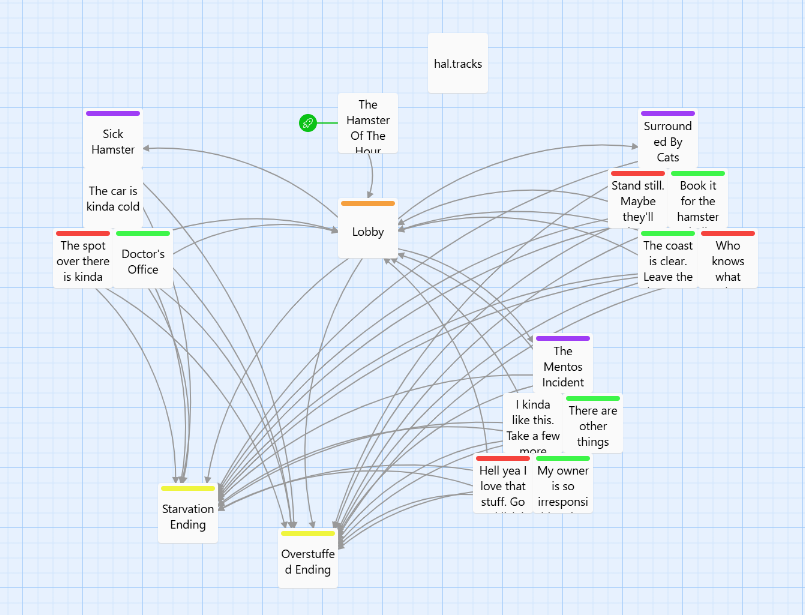
When I started making this game, I was inspired by the wild death stories of hamsters on reddit and their seeming inability to die a peaceful death. Armed with an introduction to twine and a complete blank knowledge of css and javascript, I set out to create my first ever narrative game!
Since I knew next to nothing about the coding aspect of twine, I started out by looking for stories of funny ways hamsters would die online. Reddit was definitely the best place to do this. r/HamsterDeaths in particular provided me with tons of colorful ways in which hamsters would skip the line to meet the big guy. Once I had the modes of bucket kicking lined up, I set about writing them down in a blunt, don't give a damn attitude to keep the style in line the vision I wanted for the game.
Since the beginning, I knew I wanted my game to have a low effort, MS paint quality to it, so with inspiration from reddit once more, I drew the hamster graphics with a pixel brush in procreate. Changing the theme of the page to match, however, was harder than I thought it would be.
This is where I found out about twine's CSS Stylesheet. In order to customize the font and page color, I simply needed to input code here to change how the page loads at the start of the game. The stylesheet was also useful for removing the control bar that came with the default template. Furthermore, I also used the css stylesheet to utilize the Harlow Audio Library which made audio implementation a lot easier for me.
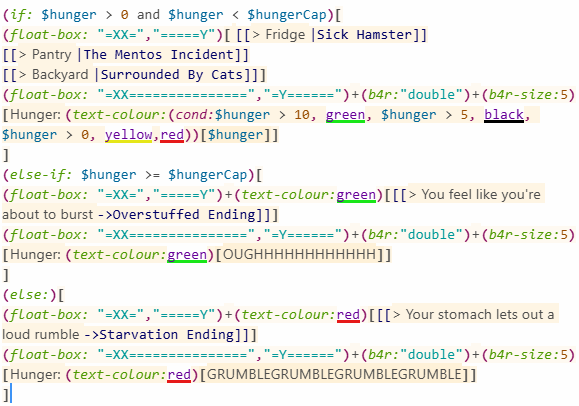
Armed with my blank white background, comic sans font and double lined textboxes, I moved onto the game mechanics. This came in the form of a hunger bar. In order to implement this, I simply made a variable in named $hunger in every passage that would keep track of your hamster's hunger. However, I would also need to keep track of the win and lose conditions for the hamster. To do this, I made special links that only showed up if your hamster's hunger went below zero or hit a certain hunger cap (which was tracked by another variable). Once this happened, I would pause the background music with a special command from Hal and play a Victory Soundtrack.
With that, I've successfully completed my first twine game!
Leave a comment
Log in with itch.io to leave a comment.